
upload photo | donate | calendar
|
my profile |
register |
faq |
search upload photo | donate | calendar |
 06-13-2019, 09:16 AM
|
#1 |
|
User

Join Date: Jun 2013
Location: Land of OZ
Posts: 52
Thanks: 46
Thanked 20 Times in 8 Posts
|
 DWM Artillery
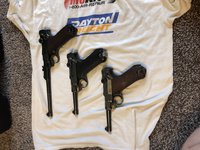
Hello Gents, Just wanted to show off my latest purchase of my first Artillery. Sneak peak and more to come when she arrives.
|

|

|
| The following member says Thank You to remerus for your post: |
|
06-13-2019, 05:00 PM
|
#4 |
|
User

Join Date: Apr 2015
Location: near Charlotte NC
Posts: 4,681
Thanks: 1,443
Thanked 4,356 Times in 2,041 Posts
|
Maybe you can find a plain background for the new pictures, I almost missed the luger.

__________________
03man(Don Voigt); Luger student and collector. Looking for DWM side plate: 69 ; Dreyse 1907 pistol K.S. Gendarmerie |
|
|
|
| The following member says Thank You to DonVoigt for your post: |
|
06-13-2019, 06:43 PM
|
#5 | |
|
User
Join Date: Jun 2013
Location: Land of OZ
Posts: 52
Thanks: 46
Thanked 20 Times in 8 Posts
|
Quote:

|
|
|
|
|
|
06-13-2019, 06:45 PM
|
#6 |
|
User
Join Date: Jun 2013
Location: Land of OZ
Posts: 52
Thanks: 46
Thanked 20 Times in 8 Posts
|
P.S for some reason the picture rotated when I uploaded it, It appears the right way up on my computer. Can this be changed once uploaded or is that it?
|
|
|
|
|
06-14-2019, 12:41 AM
|
#7 | |
|
User
Join Date: Apr 2015
Location: near Charlotte NC
Posts: 4,681
Thanks: 1,443
Thanked 4,356 Times in 2,041 Posts
|
Quote:
They rotate when they want too. 
__________________
03man(Don Voigt); Luger student and collector. Looking for DWM side plate: 69 ; Dreyse 1907 pistol K.S. Gendarmerie |
|
|
|
|
|
06-14-2019, 12:57 AM
|
#8 |
|
User

Join Date: Jan 2010
Location: Nampa, Idaho
Posts: 643
Thanks: 854
Thanked 958 Times in 374 Posts
|
I found a "fix" for the rotation issue. It may or may not work for you, but so far it seems to work for me. I take pics with my iPhone, email them to my computer and create a folder to store them. My fix is to double click on the image and using the rotation icon (I use a Mac), rotate it 360 degrees. It is saved when I close the image. I've been doing this for over 20 pics and the image is always upright when I post.
G2 |
|
|
|
| The following member says Thank You to gunnertwo for your post: |
|
06-14-2019, 06:37 AM
|
#9 |
|
User
Join Date: Feb 2018
Location: South Carolina
Posts: 889
Thanks: 838
Thanked 901 Times in 435 Posts
|
It is possible to rotate a picture on an iPhone to the desired degree angle.
1. Go to your pictures in question 2. Tap “edit” on the bottom menu. If the menu is not there, simply tap the picture once to bring it up. 3. Tap the square button with little arrows around it 4. Ignore the compass-like ability to rotate the picture at this point, hit the small square with the one arrow in a quarter-circle pointing counter clockwise in the bottom left quarter of your screen until you’ve got your picture rotated to the desired position 5. Hit “done” and then post as you would any other picture from your phone. I am in this forum nearly exclusively from my phone.
__________________
-QM |
|
|
|
 |
|
|




 Linear Mode

