
upload photo | donate | calendar
|
my profile |
register |
faq |
search upload photo | donate | calendar |
 03-15-2011, 03:58 PM
|
#1 |
|
User

Join Date: Oct 2002
Location: N.J.
Posts: 85
Thanks: 3
Thanked 4 Times in 3 Posts
|
 Question on double date DWM
luger 1917/1920. front grip strap marked 'Ma.716'
Back of rear toggle also marked '716' Not the gun serial number. I assume 716 is gun number, but what does 'Ma.' stand for ?? thanks gentelmen........
__________________
blessed are those who expect nothing.........for they shall not be disappointed. |

|

|
|
03-15-2011, 06:58 PM
|
#2 |
|
User
Join Date: Feb 2004
Location: Orygun
Posts: 4,243
Thanks: 118
Thanked 245 Times in 150 Posts
|
John,
Ma. is the abbreviation for Marienwerder. It is a town in east Prussia. Your Luger was issued either to the Schutzpolizei (Municpal Police) of the town, or to the Landjagerei (Rural Police) in that district. Unusual that there's not an S (Schutzpolizei) or L (Landjagerei) preceding the Ma. The 716 is a rack or Police inventory number. Ron
__________________
I Still Need DWM side plate #49... if anyone runs across a nice one. What ~Rudyard Kipling~ said... |
|
|
|
|
03-15-2011, 07:36 PM
|
#3 |
|
User
Join Date: Oct 2002
Location: N.J.
Posts: 85
Thanks: 3
Thanked 4 Times in 3 Posts
|
Ron thank you.
thanks much for the i.d. I think the 1917 holster has some printing in it also but hard to make out. Have to check it again........
__________________
blessed are those who expect nothing.........for they shall not be disappointed. |
|
|
|
|
03-15-2011, 09:15 PM
|
#4 |
|
Patron
LugerForum Patron 
Join Date: Aug 2004
Location: Houston, TX
Posts: 1,429
Thanks: 67
Thanked 292 Times in 191 Posts
|
Ron, I hate to do this again
 but this marking recently has been identified as being from the Baden Schutzpolizei in Mannheim. See HWIS update #9 on http://www.historywritinsteel.com/New_Insights.html. but this marking recently has been identified as being from the Baden Schutzpolizei in Mannheim. See HWIS update #9 on http://www.historywritinsteel.com/New_Insights.html.John, for my database I would greatly appreciate knowing the serial number & suffix of this pistol as well as whether or not it has a sear and/or mag safety. I would also be interested in knowing whether there is a circled "S" stamped on the left side of the receiver. Thanks very much for posting this.
__________________
Regards, Don donmaus1@aol.com Author of History Writ in Steel: German Police Markings 1900-1936 http://www.historywritinsteel.com |
|
|
|
|
03-15-2011, 10:08 PM
|
#5 | |
|
User
Join Date: Oct 2002
Location: N.J.
Posts: 85
Thanks: 3
Thanked 4 Times in 3 Posts
|
Don
Quote:
Left side on frame above grip small sliver of metal going into frame ??? I hope my pics capture all aspects needed. Holster by C. Heinichen, Dresden, 1917 under flap....noted : St. Pol.( & Possibly) GH. Little further away larger LC did not note an S in circle on left side...........
__________________
blessed are those who expect nothing.........for they shall not be disappointed. |
|
|
|
|
|
03-15-2011, 11:07 PM
|
#6 |
|
Patron
LugerForum Patron
Join Date: Aug 2004
Location: Houston, TX
Posts: 1,429
Thanks: 67
Thanked 292 Times in 191 Posts
|
John, from the photos it appears that this is an Erfurt, has a sear safety and a disabled mag safety. If the toggle is stamped DWM as you indicate in the thread title, at least the toggle has been replaced. I think others on the forum would be interested in your photos, including one of the top of the gun as well as the bottom of the barrel. You will probably need to reduce the size of the photos to post them.
The holster also sounds interesting. Is the closure police style (vertical up-strap with stud)? If you can provide photos of this, including the markings under the flap, it would be great.
__________________
Regards, Don donmaus1@aol.com Author of History Writ in Steel: German Police Markings 1900-1936 http://www.historywritinsteel.com |
|
|
|
|
03-15-2011, 11:50 PM
|
#7 |
|
User
Join Date: Oct 2002
Location: N.J.
Posts: 85
Thanks: 3
Thanked 4 Times in 3 Posts
|
don
it looks like the buckle type closure strap was changed to strap going into slotted opening, like the artillery holster type.
I was thinking the GN on holster was 'gelnhausen' near manheim (I think). I don't have macro camera, so can't get to close. the finish for the middle toggle is exactly equal to the front and rear toggle. don't appear changed ????? I'll have to try and take more pics of top and holster. Holster v.good condition although well used. looks like someone in the past dyed it black (as I know germans did during WW1) with a very nice finish, like patten leather. the 2 mags are also matching.
__________________
blessed are those who expect nothing.........for they shall not be disappointed. |
|
|
|
|
03-15-2011, 11:52 PM
|
#8 |
|
User
Join Date: Oct 2002
Location: N.J.
Posts: 85
Thanks: 3
Thanked 4 Times in 3 Posts
|
Don
p.s. too dumb to figure out how to reduce the pics. that's why I sent them to your email...........
__________________
blessed are those who expect nothing.........for they shall not be disappointed. |
|
|
|
|
03-16-2011, 12:11 AM
|
#9 |
|
Super Moderator
Eternal Lifer LugerForum Patron 
Join Date: Jun 2002
Location: North of Spokane, WA
Posts: 15,980
Thanks: 2,078
Thanked 4,614 Times in 2,127 Posts
|
I'll bet you a dollar your camera has a macro feature, unless you are using a cell phone. I also bet it has a 'email setting" which I dislike, because with full pictures you cam crop and resize. An easy skill once you figure it out, AND have the proper software (most photo software includes it).
i'd offer to resize it myself, but my internet is so slow here that 7-12 megabytes would be forever.... Ed
__________________
Edward Tinker ************ Co-Author of Police Lugers - Co-Author of Simson Lugers Author of Veteran Bring Backs Vol I, Vol II, Vol III and Vol IV |
|
|
|
|
03-16-2011, 12:30 AM
|
#10 | |
|
User
Join Date: Oct 2002
Location: N.J.
Posts: 85
Thanks: 3
Thanked 4 Times in 3 Posts
|
hi
Quote:
__________________
blessed are those who expect nothing.........for they shall not be disappointed. |
|
|
|
|
|
03-16-2011, 12:56 AM
|
#11 |
|
Super Moderator
Eternal Lifer LugerForum Patron
Join Date: Jun 2002
Location: North of Spokane, WA
Posts: 15,980
Thanks: 2,078
Thanked 4,614 Times in 2,127 Posts
|
http://support.en.kodak.com/app/answ.../selected/true
http://resources.kodak.com/support/s...0330c4s3.shtml 4 Doing more with your camera Taking close-up and landscape pictures Use the Close-up/Landscape button  to take pictures of scenes that are very close or very far away. to take pictures of scenes that are very close or very far away.  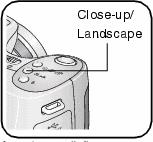 1. Set the Mode dial to any Capture mode. 1. Set the Mode dial to any Capture mode. 2. Press the Close-up/Landscape button  repeatedly until the repeatedly until the  or or  icon appears in the status bar. icon appears in the status bar. 3. Take a picture. Close-up pictures Use the Close-up setting  to gain sharpness and detail in pictures at close range. Use available light instead of flash if possible. The camera automatically sets the focus distance depending on the zoom position: to gain sharpness and detail in pictures at close range. Use available light instead of flash if possible. The camera automatically sets the focus distance depending on the zoom position: or if not too many pictures, or you're so frustrated, then gladly send them to me  weimar_lugers@verizon.net Ed |
|
|
|
| The following member says Thank You to Edward Tinker for your post: |
|
03-16-2011, 08:51 AM
|
#12 |
|
User
Join Date: Feb 2004
Location: Orygun
Posts: 4,243
Thanks: 118
Thanked 245 Times in 150 Posts
|
"Ron, I hate to do this again but this marking recently has been identified as being from the Baden Schutzpolizei in Mannheim.
Don" I found it in Görtz and Bryan's and verified it with your book.  Ron
__________________
I Still Need DWM side plate #49... if anyone runs across a nice one. What ~Rudyard Kipling~ said... |
|
|
|
|
03-16-2011, 11:18 AM
|
#13 | |
|
Patron
LugerForum Patron
Join Date: Aug 2004
Location: Houston, TX
Posts: 1,429
Thanks: 67
Thanked 292 Times in 191 Posts
|
Quote:
__________________
Regards, Don donmaus1@aol.com Author of History Writ in Steel: German Police Markings 1900-1936 http://www.historywritinsteel.com |
|
|
|
|
|
03-16-2011, 11:44 AM
|
#14 |
|
User
Join Date: Oct 2002
Location: N.J.
Posts: 85
Thanks: 3
Thanked 4 Times in 3 Posts
|
Ed...........I tried all the things you mentioned in your reply. nothing works on my camera. I will check with the company about this. thanks
__________________
blessed are those who expect nothing.........for they shall not be disappointed. |
|
|
|
|
03-16-2011, 04:30 PM
|
#15 |
|
Patron
LugerForum Patron
Join Date: Aug 2004
Location: Houston, TX
Posts: 1,429
Thanks: 67
Thanked 292 Times in 191 Posts
|
John, I have edited some of the photos you sent me. There is no question in my mind that the frame, receiver and barrel are from an Erfurt and that the entire toggle train has been replaced with one from DWM. The serial numbers on the toggle train appear to be force matched. The grip strap marking is definitely from the Mannheim Schupo. The "a" is distinctive and characteristic of others from this unit and the marking is stamped in reverse of Prussian markings. This is the first example of a P08 with Ma. markings that does not have a circled-S on the left side of the receiver.
The holster is typical of the WWI military holsters that were converted for police use but the markings inside the cover are quite interesting. I'm virtually certain one of the markings is St. Pol. Sd. which I interpret as Staatliche Polizei Stralsund. This may have been a Gestapo marking from the early 1930s. The other marking appears to be L.G. This is somewhat puzzling to me. I'm tempted to interpret it as Landesgendarmerie but I have never seen this marking on holsters originally manufactured for P08s. I do not believe this holster saw service with this pistol. The holster appears to have northern Germany markings while the pistol is from the south.
__________________
Regards, Don donmaus1@aol.com Author of History Writ in Steel: German Police Markings 1900-1936 http://www.historywritinsteel.com Last edited by Don M; 03-23-2011 at 12:25 PM. Reason: Deleted comment about possible correlation between circled-S marking and DWM. |
|
|
|
|
03-16-2011, 09:50 PM
|
#16 |
|
User
Join Date: Feb 2004
Location: Orygun
Posts: 4,243
Thanks: 118
Thanked 245 Times in 150 Posts
|
Don,
I'll stick with the Military Unit marks, you can have the Police marks. As my Grandad used to say "It takes all my knowin', just to know what I'm knowin'."  Ron
__________________
I Still Need DWM side plate #49... if anyone runs across a nice one. What ~Rudyard Kipling~ said... |
|
|
|
|
03-17-2011, 06:44 AM
|
#17 |
|
Lifer
Lifetime Forum Patron 
Join Date: Feb 2009
Location: ...on the 'ol Erie Canal...
Posts: 8,208
Thanks: 1,425
Thanked 4,474 Times in 2,343 Posts
|
Looking at the side photo, it appears that the magazine safety is intact...
 Question: Would that make this or any Police Luger more collectible??? (Edit: Sideplate is definitely an Erfurt also)
__________________
I like my coffee the way I like my women... ...Cold and bitter... 
|
|
|
|
|
03-17-2011, 07:40 AM
|
#18 |
|
User

Join Date: Mar 2008
Location: Marco Island, Florida
Posts: 4,867
Thanks: 1,685
Thanked 1,917 Times in 1,193 Posts
|
I would guess that only the bar is intact. All that is behind the sideplate is probably gone. Some people snipped the bar off entirely, others took out the parts behind the sideplate.
|
|
|
|
|
03-17-2011, 08:57 AM
|
#19 | |
|
Patron
LugerForum Patron
Join Date: Aug 2004
Location: Houston, TX
Posts: 1,429
Thanks: 67
Thanked 292 Times in 191 Posts
|
Quote:
__________________
Regards, Don donmaus1@aol.com Author of History Writ in Steel: German Police Markings 1900-1936 http://www.historywritinsteel.com |
|
|
|
|
|
03-23-2011, 12:27 PM
|
#20 |
|
Patron
LugerForum Patron
Join Date: Aug 2004
Location: Houston, TX
Posts: 1,429
Thanks: 67
Thanked 292 Times in 191 Posts
|
I have found in my database another Ma. Erfurt that does have a circled-S and have revised my previous post accordingly.
__________________
Regards, Don donmaus1@aol.com Author of History Writ in Steel: German Police Markings 1900-1936 http://www.historywritinsteel.com |
|
|
|
 |
|
|


 Linear Mode

