http://support.en.kodak.com/app/answ.../selected/true
http://resources.kodak.com/support/s...0330c4s3.shtml
4 Doing more with your camera
Taking close-up and landscape pictures
Use the Close-up/Landscape button

to take pictures of scenes that are very close or very far away.

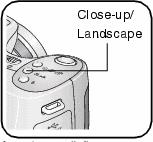
1. Set the Mode dial to any Capture mode.
2. Press the Close-up/Landscape button

repeatedly until the

or

icon appears in the status bar.
3. Take a picture.
Close-up pictures
Use the Close-up setting

to gain sharpness and detail in pictures at close range. Use available light instead of flash if possible. The camera automatically sets the focus distance depending on the zoom position:
or if not too many pictures, or you're so frustrated, then gladly send them to me
 weimar_lugers@verizon.net
Ed