
upload photo | donate | calendar
|
my profile |
register |
faq |
search upload photo | donate | calendar |
 01-11-2013, 12:26 AM
|
#1 |
|
New User
Join Date: Jan 2013
Location: Columbus, Ohio
Posts: 2
Thanks: 0
Thanked 0 Times in 0 Posts
|
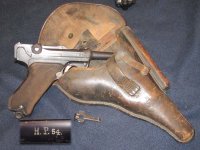
 Help identifying 1918 matching parts luger
My first Luger and new to the forum. Just looking for any and all information someone could provide about this particular gun. Serial no. is 6254 with no letter and all matching parts. 9mm luger
Thanks  [IMG]<a href="http://s1358.beta.photobucket.com/user/kwt90/media/2437A235-4C30-4D23-9BCB-492058C6CF13-7959-00000662CD74A7E1.jpg.html" target="_blank"><img src="http://i1358.photobucket.com/albums/q762/kwt90/2437A235-4C30-4D23-9BCB-492058C6CF13-7959-00000662CD74A7E1.jpg" border="0" alt="Uploaded from the Photobucket iPhone App"/></a>[/IMG] [IMG]<a href="http://s1358.beta.photobucket.com/user/kwt90/media/2CD9EFC7-E69F-46A9-8638-F24C93BC0A8C-7959-00000662D61D3F84.jpg.html" target="_blank"><img src="http://i1358.photobucket.com/albums/q762/kwt90/2CD9EFC7-E69F-46A9-8638-F24C93BC0A8C-7959-00000662D61D3F84.jpg" border="0" alt="Uploaded from the Photobucket iPhone App"/></a>[/IMG] [IMG]<a href="http://s1358.beta.photobucket.com/user/kwt90/media/68F03F6C-2C4F-4609-8344-C6C9B254349C-7959-00000662E7B94282.jpg.html" target="_blank"><img src="http://i1358.photobucket.com/albums/q762/kwt90/68F03F6C-2C4F-4609-8344-C6C9B254349C-7959-00000662E7B94282.jpg" border="0" alt="Uploaded from the Photobucket iPhone App"/></a>[/IMG] [IMG]<a href="http://s1358.beta.photobucket.com/user/kwt90/media/02F4A249-B504-42A2-9F26-D26DE5D44026-7959-00000662F42BA7F3.jpg.html" target="_blank"><img src="http://i1358.photobucket.com/albums/q762/kwt90/02F4A249-B504-42A2-9F26-D26DE5D44026-7959-00000662F42BA7F3.jpg" border="0" alt="Uploaded from the Photobucket iPhone App"/></a>[/IMG] |

|

|
|
01-11-2013, 01:38 AM
|
#2 |
|
User
Join Date: Aug 2012
Location: Augusta, GA
Posts: 448
Thanks: 52
Thanked 88 Times in 49 Posts
|
Well, kinda hard to determine what it is through picture links only.
 None of your pictures came through on your thread. None of your pictures came through on your thread.Lets see if I maybe can help guide you through posting them. Hit another reply on this thread and go to advanced reply in stead of quick reply. When that window opens, scroll down to the bottom and find the manage attachments button. hit that and go to the window that has like ten or so spaces where you can link the pictures to the thread. They have browse next to them.. Just hit browse and locate them on your computer. Once they are there hit upload and wait until you see them pop up towards the bottom of that menu. Once they have popped up close that window and go back up to the portion where you can type what you wnat. In the toolbar there is a paperclip shaped button, hit that and all the pictures you uploaded should be there. Just insert them one by one or hit insert all. However you want. Maybe this will help a little to get you posting some pictures. |
|
|
|
|
01-11-2013, 02:30 AM
|
#3 |
|
New User
Join Date: Jan 2013
Location: Columbus, Ohio
Posts: 2
Thanks: 0
Thanked 0 Times in 0 Posts
|
How about now?
|
|
|
|
|
01-11-2013, 08:49 AM
|
#4 |
|
User
Join Date: Aug 2012
Location: Augusta, GA
Posts: 448
Thanks: 52
Thanked 88 Times in 49 Posts
|
That worked. Welcome to the Luger forum. I'm still kinda new to this as well. So enjoy reading up.
|
|
|
|
 |
| Thread Tools | |
| Display Modes | |
|
|


 Linear Mode

